
Booking software for appliance repair technicians
Half of appliance repair is knowing the model before you knock. Booki Booki collects the brand, model and serial number on the form, keeps your next stop reachable, and invoices from the kitchen.
- Clients book from your link or your website, any time of day
- Only the times you can reach between jobs are shown
- Your form asks for which appliance, and what brand before you accept the job
- PDF invoices from your phone, with Stripe payment links on Pro
Why appliance repair technicians use Booki Booki
Appliance repair techs lose whole visits to one missing detail. You drive to a West Kelowna kitchen for a dishwasher, find out it is a brand you do not carry parts for, and now it is a second trip. Choosing general repair at sign-up gives you a ready-made form, and you can add what matters to your trade: the appliance type, the brand, the model and serial number from the sticker inside the door, the symptom, and whether it is still under warranty.
The Okanagan stretches along the lake, and the drive from Lake Country to Peachland eats an hour of your day. With Location-Based Booking on the Pro plan, Booki Booki compares the client’s address with your Base Address and the day’s other visits, and hides times you could not reach. On Pro, diagnostic visits can be paid at booking through your own Stripe account, and the final repair goes out as a PDF invoice with a payment link.
Second trips for the right part
Make the model and serial number required. You can look up the part before the visit and bring it, instead of booking a return trip.
Driving the length of the valley twice
Set your Base Address and Commute Mode once. A client in Lake Country is not offered a slot right after a job in Peachland.
Diagnostic fees nobody wants to pay later
On the Pro plan, require payment before the booking is confirmed for the diagnostic visit, then invoice the repair with a Stripe payment link.
A Friday in Kelowna
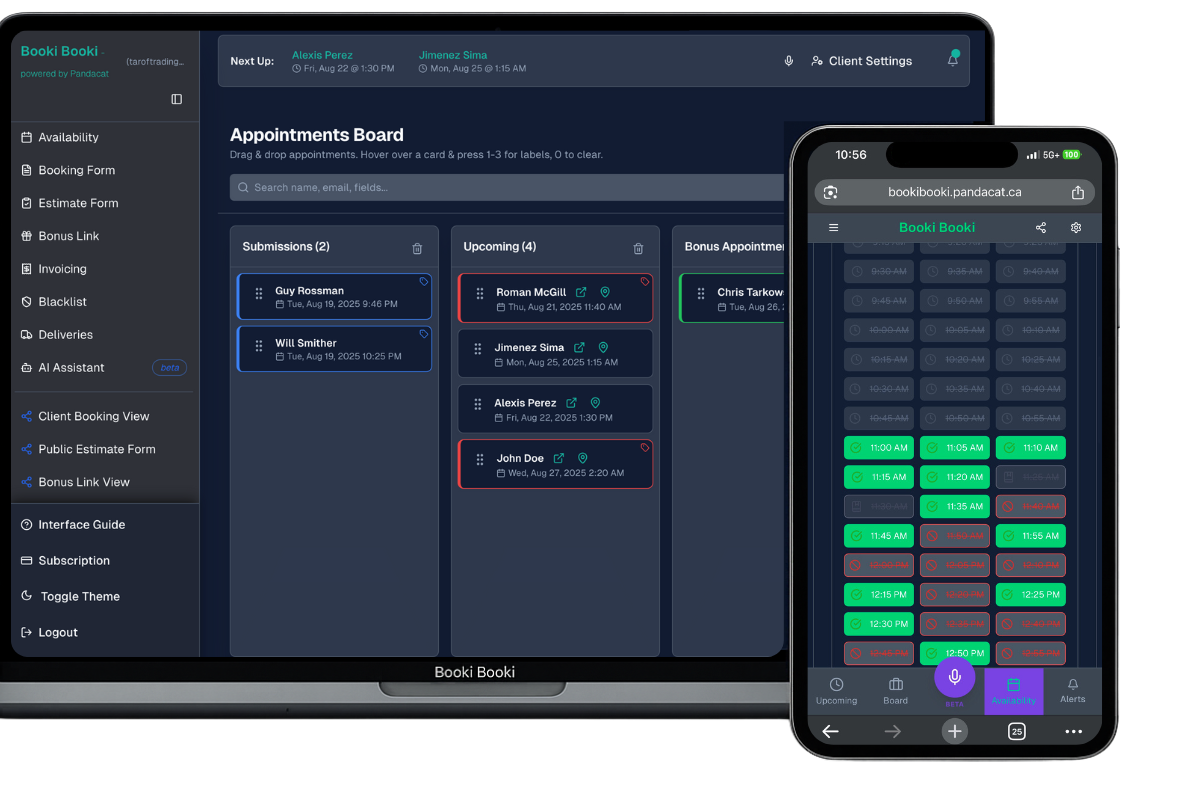
You work out of a shop in Rutland. A client in the Mission books 9 am for a front-load washer that stops mid-cycle; their form lists the brand, model and serial number, and says the drain hose was replaced last year. You pick up a drain pump before you leave. At 9:30, someone in West Kelowna opens your link because their fridge stopped cooling. The 10:30 slot is hidden, since crossing the bridge from the Mission after a 10:15 finish will not fit, so they book 11:15 and pay the diagnostic fee by Stripe at booking. Both cards sit on your board with directions, and both invoices are paid before lunch.
Set up your booking form for appliance repair technicians
Typical appointment length: 45–90 minutes. Set it under Availability so the right number of time slots show. Then ask the questions that save you a phone call.
Questions to put on the form
- Which appliance, and what brand?
- Model and serial number (usually on a sticker inside the door)
- What is it doing, or not doing?
- Is it still under the manufacturer’s warranty?
Services for the drop-down
- Washer not draining
- Dryer not heating
- Fridge not cooling
- Dishwasher leak
- Oven and range repair
- Ice maker repair
Everything an appliance repair technician needs, in one account
Location-Based Booking
Base Address, Commute Mode and your existing appointments decide which times a client can see. Pro plan.
Custom booking forms
Required fields, drop-downs, checkboxes and format rules so every booking arrives complete.
Reminders
Email reminders on every plan; SMS confirmations and reminders on Pro.
Invoicing
PDF invoices emailed in a tap, with an AI generator that drafts them from the appointment.
Payments
Your own Stripe account. Require payment at booking or send a payment link with the invoice. Pro plan.
iOS and Android apps
The board, invoices and AI assistant in your pocket, with push notifications.
How it works
Set your hours and base
Enter your working hours, your Base Address and how you get around. Set the appointment length for a typical washer not draining (45–90 minutes).
Build the form
Pick your industry at sign-up and edit the pre-filled form. Add which appliance, and what brand and model and serial number (usually on a sticker inside the door), and make them required.
Share the link
Put the booking link in your Google Business Profile, Instagram bio and website. Bookings land on your board with the address and directions.
Frequently asked questions
How do I get clients to find the model number?
Can I charge for the diagnostic visit up front?
Can I follow up when an ordered part arrives?
How much does Booki Booki cost for an appliance repair technician?
Is there a mobile app?
Can clients cancel or reschedule on their own?
Prefer to take bookings by phone? See the AI receptionist for appliance repair technicians. It answers while you work and books onto the same board.
Give appliance repair technicians a booking page that respects the day
Booking, forms, board, invoices and payments in one account. Free for 30 days, then from $15 USD a month.
Booking software for other industries
- Mobile mechanics
- Mobile car detailers
- Pressure washing companies
- Window cleaners
- Lawn care and landscaping companies
- Pool and hot tub service technicians
- Junk removal companies
- Handyman services
- House cleaning companies
- Carpet and upholstery cleaners
- Plumbers
- Electricians
- HVAC companies
- Locksmiths
- Phone and computer repair shops
- Mobile pet groomers
- Mobile massage therapists
- Physiotherapy clinics
- Personal trainers
- Mobile hairdressers and barbers
- Lash and brow technicians
- Mobile notaries and commissioners
- Photographers