
Booking software for mobile car detailers
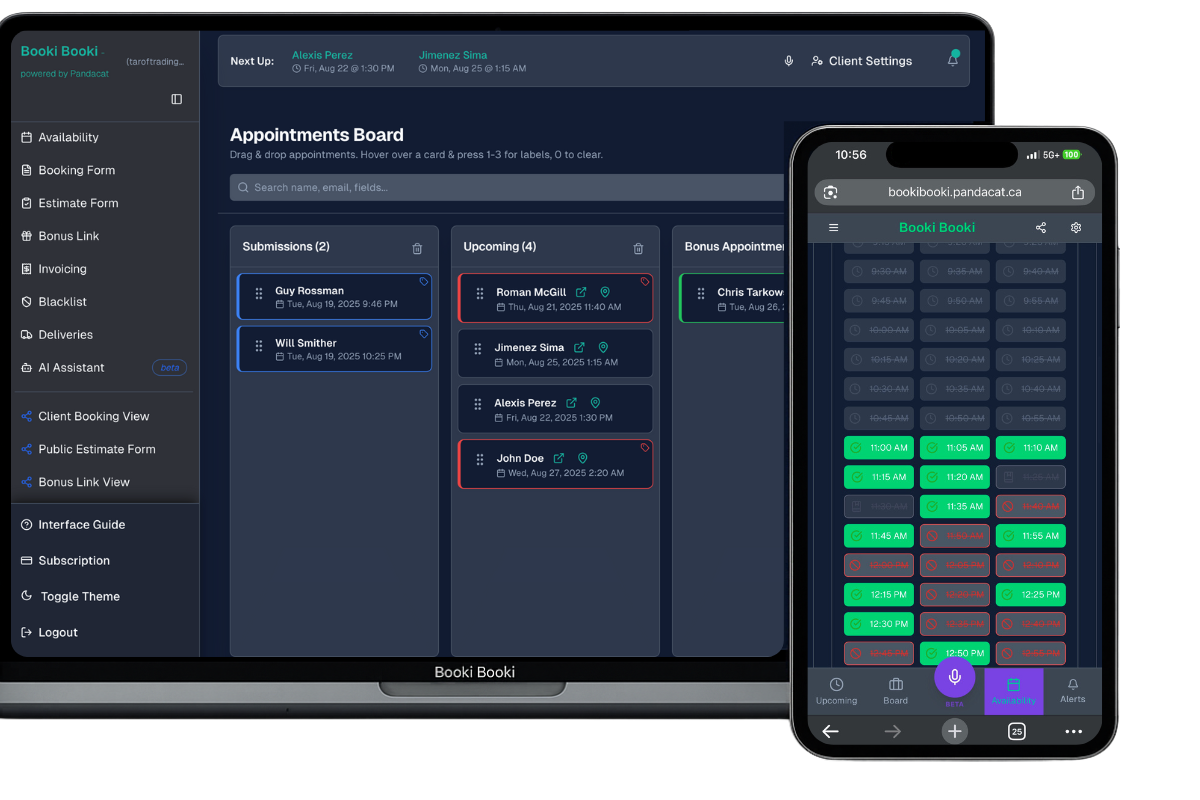
A full detail eats half your day and the drive eats the rest. Booki Booki books packages around the real travel time and asks about parking, water and power before you load the van.
- Clients book from your link or your website, any time of day
- Only the times you can reach between jobs are shown
- Your form asks for vehicle type and size (sedan, suv, truck, van) before you accept the job
- PDF invoices from your phone, with Stripe payment links on Pro
Why mobile car detailers use Booki Booki
Mobile detailing jobs vary more than almost any other trade: a maintenance wash on a Model 3 is 90 minutes, a paint correction on a black F-150 can take most of a day. If your booking tool treats every gap the same, a client in Kitsilano books 1 pm while you are still clay-barring in Burnaby. Booki Booki’s Location-Based Booking (Pro) checks the drive from your other jobs that day to the client’s address and hides any time you could not reach.
The booking form does the walk-around for you. A drop-down for the package, a required field for vehicle size, and a question about where the car sits (condo parkade, street, driveway) tell you whether you need the water tank and generator before you leave. On the Pro plan, clients get a reminder text the day before, so fewer people drive the car to work by mistake. After the job, a PDF invoice with a Stripe payment link goes out while the coating cures.
Across the bridge with no time to get there
Set your Base Address and Commute Mode once. A client in North Vancouver only sees times that fit the drive from your Richmond job, not the ones that overlap it.
A parkade with no water and low clearance
Ask about the parking spot, height clearance and access to water and power on the form, and make it required. You know before you go whether to bring the tank.
No-shows on full-day ceramic jobs
On the Pro plan, require payment through your own Stripe account before a booking is confirmed, and set a window inside which clients cannot cancel online.
A Saturday in Metro Vancouver
You leave your base in East Vancouver at 8 am. A client in Kitsilano has booked a full interior and exterior detail on a Highlander at 8:30 (three hours). At 9 a condo owner near Metrotown in Burnaby opens your link for pet hair removal. Times before about noon are hidden, because you are still in Kitsilano and the drive takes time. They book 12:15 and answer that the car is in visitor parking on P2 with no water access, so you fill the tank before you go. Both cards sit on your board with addresses and directions. The Kitsilano invoice is paid by Stripe before you pack up the extractor.
Set up your booking form for mobile car detailers
Typical appointment length: 2–6 hours. Set it under Availability so the right number of time slots show. Then ask the questions that save you a phone call.
Questions to put on the form
- Vehicle type and size (sedan, SUV, truck, van)
- Which package do you want?
- Where will the car be (driveway, underground parkade, street)?
- Is there water or a power outlet within reach of the car?
Services for the drop-down
- Full interior and exterior detail
- Interior shampoo and stain removal
- Pet hair removal
- Paint correction
- Ceramic coating
- Maintenance wash
Everything a mobile car detailer needs, in one account
Location-Based Booking
Base Address, Commute Mode and your existing appointments decide which times a client can see. Pro plan.
Custom booking forms
Required fields, drop-downs, checkboxes and format rules so every booking arrives complete.
Reminders
Email reminders on every plan; SMS confirmations and reminders on Pro.
Invoicing
PDF invoices emailed in a tap, with an AI generator that drafts them from the appointment.
Payments
Your own Stripe account. Require payment at booking or send a payment link with the invoice. Pro plan.
iOS and Android apps
The board, invoices and AI assistant in your pocket, with push notifications.
How it works
Set your hours and base
Enter your working hours, your Base Address and how you get around. Set the appointment length for a typical full interior and exterior detail (2–6 hours).
Build the form
Pick your industry at sign-up and edit the pre-filled form. Add vehicle type and size (sedan, suv, truck, van) and which package do you want, and make them required.
Share the link
Put the booking link in your Google Business Profile, Instagram bio and website. Bookings land on your board with the address and directions.
Frequently asked questions
Can clients choose a detailing package when they book?
Can I take payment up front for ceramic coatings?
What do I do when rain wrecks a week of outdoor washes?
How much does Booki Booki cost for a mobile car detailer?
Is there a mobile app?
Can clients cancel or reschedule on their own?
Prefer to take bookings by phone? See the AI receptionist for mobile car detailers. It answers while you work and books onto the same board.
Give mobile car detailers a booking page that respects the day
Booking, forms, board, invoices and payments in one account. Free for 30 days, then from $15 USD a month.
Booking software for other industries
- Mobile mechanics
- Pressure washing companies
- Window cleaners
- Lawn care and landscaping companies
- Pool and hot tub service technicians
- Junk removal companies
- Handyman services
- House cleaning companies
- Carpet and upholstery cleaners
- Plumbers
- Electricians
- HVAC companies
- Appliance repair technicians
- Locksmiths
- Phone and computer repair shops
- Mobile pet groomers
- Mobile massage therapists
- Physiotherapy clinics
- Personal trainers
- Mobile hairdressers and barbers
- Lash and brow technicians
- Mobile notaries and commissioners
- Photographers