
Booking software for personal trainers
Your gym is a client’s basement one hour and a river valley park the next. Booki Booki shows clients only the times you can reach and keeps your regulars booking.
- Clients book from your link or your website, any time of day
- Only the times you can reach between jobs are shown
- Your form asks for main goal (strength, weight loss, mobility, sport) before you accept the job
- PDF invoices from your phone, with Stripe payment links on Pro
Why personal trainers use Booki Booki
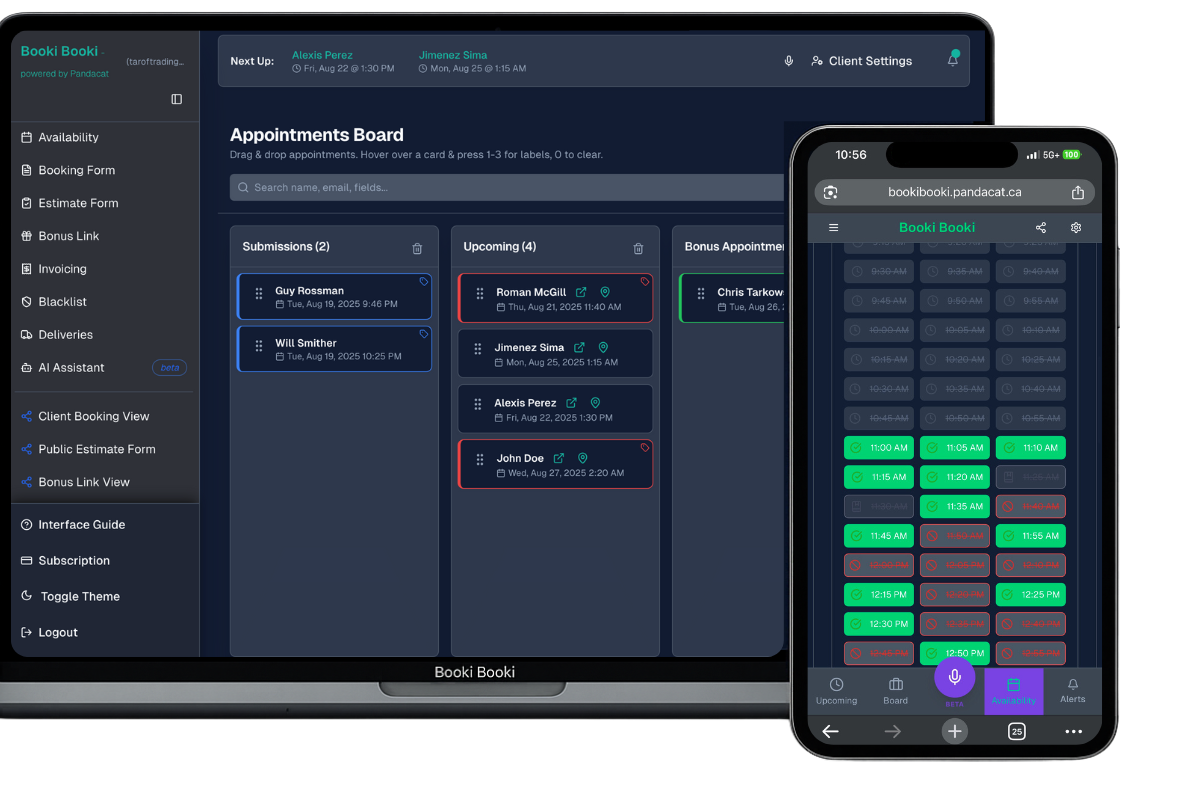
A mobile trainer’s day is 45-minute sessions stitched together by drives, with a kettlebell bag and a set of bands in the trunk. In Edmonton, a 6 am session in Windermere and a 7 am session in Oliver do not fit, no matter how efficient the workout. On the Pro plan, Location-Based Booking checks the sessions already on your day, your Commute Mode and the client’s address, and hides the start times you could not make. If you also train some clients at a studio, those sessions sit on the same board.
The booking form gets you the basics before session one: the client’s goal, anything you should know such as a recent injury, where you will train and what equipment is there. Choosing fitness at sign-up pre-fills a form you can edit. Regulars use the bonus link and a one-time code to book the next session without the full form. On Pro, you can require payment at booking through your own Stripe account, and clients who prefer to train online can meet you by Zoom.
Back-to-back sessions on opposite sides of the river
Set your Base Address and Commute Mode once. Clients only see start times that fit the drive from your previous session.
Regulars who forget to rebook
Send the bonus link after each session. With a one-time code, a regular books next week in a few taps instead of re-entering everything.
Last-minute cancellations at 6 am
Set a window, such as no changes inside 12 hours, and on Pro require payment at booking so your early slots go to clients who have committed.
A Wednesday in Edmonton
Your Base Address is in Strathcona. At 6 am you train a client in her basement gym in Windermere (60 minutes). The night before, a condo owner in Oliver opened your link for a 60-minute session in his building’s gym. He did not see 7:15; the drive from Windermere after a 7 am finish makes that impossible. He saw 7:45 and later, booked 8 am and added the buzzer code on the form. At noon you meet a client for a running session at Hawrelak Park, and at 5 pm you run an online check-in by Zoom from home. The bonus link goes out after each session.
Set up your booking form for personal trainers
Typical appointment length: 45–60 minutes. Set it under Availability so the right number of time slots show. Then ask the questions that save you a phone call.
Questions to put on the form
- Main goal (strength, weight loss, mobility, sport)
- Anything to know before training, such as an injury or recent surgery?
- Where will you train: home, park or condo gym (with buzzer code)?
- What equipment is available on site?
Services for the drop-down
- In-home training session
- Outdoor park session
- Condo gym session
- Fitness assessment
- Partner or small-group session
- Online session by Zoom
Everything a personal trainer needs, in one account
Location-Based Booking
Base Address, Commute Mode and your existing appointments decide which times a client can see. Pro plan.
Custom booking forms
Required fields, drop-downs, checkboxes and format rules so every booking arrives complete.
Reminders
Email reminders on every plan; SMS confirmations and reminders on Pro.
Invoicing
PDF invoices emailed in a tap, with an AI generator that drafts them from the appointment.
Payments
Your own Stripe account. Require payment at booking or send a payment link with the invoice. Pro plan.
iOS and Android apps
The board, invoices and AI assistant in your pocket, with push notifications.
How it works
Set your hours and base
Enter your working hours, your Base Address and how you get around. Set the appointment length for a typical in-home training session (45–60 minutes).
Build the form
Pick your industry at sign-up and edit the pre-filled form. Add main goal (strength, weight loss, mobility, sport) and anything to know before training, such as an injury or recent surgery, and make them required.
Share the link
Put the booking link in your Google Business Profile, Instagram bio and website. Bookings land on your board with the address and directions.
Frequently asked questions
Can clients choose to train at a park instead of at home?
Can I ask about injuries before the first session?
Do you handle online sessions too?
How much does Booki Booki cost for a personal trainer?
Is there a mobile app?
Can clients cancel or reschedule on their own?
Prefer to take bookings by phone? See the AI receptionist for personal trainers. It answers while you work and books onto the same board.
Give personal trainers a booking page that respects the day
Booking, forms, board, invoices and payments in one account. Free for 30 days, then from $15 USD a month.
Booking software for other industries
- Mobile mechanics
- Mobile car detailers
- Pressure washing companies
- Window cleaners
- Lawn care and landscaping companies
- Pool and hot tub service technicians
- Junk removal companies
- Handyman services
- House cleaning companies
- Carpet and upholstery cleaners
- Plumbers
- Electricians
- HVAC companies
- Appliance repair technicians
- Locksmiths
- Phone and computer repair shops
- Mobile pet groomers
- Mobile massage therapists
- Physiotherapy clinics
- Mobile hairdressers and barbers
- Lash and brow technicians
- Mobile notaries and commissioners
- Photographers